

Eaton Tripp Lite B006-VU4-1 4-Port Power Supply/2-USB VGA KVM Switch
B006-VU4-1
|TC-B006VU41
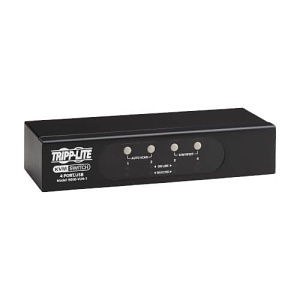
Eaton Tripp Lite B006-VU4-1 4-Port Power Supply/2-USB VGA KVM Switch
B006-VU4-1 | TC-B006VU41
Please sign in to view pricing, availability, and to add to cart.
Product Overview
Features | Connects 4 Computers to a VGA Monitor and a Single Keyboard/Mouse
This single-monitor KVM switch lets you connect as many as four computers, which you can access and control by toggling between them. All connected computers share one VGA monitor and one USB or PS/2 keyboard/mouse, which saves space on your desk or workspace. The B006-VU4-1 supports video resolutions up to 2048 x 1536 (DDC2B).
Switching Between Computers Is Fast and Easy
Use the front-panel push buttons, hotkey commands or connected mouse for quick and easy switching among computers. You can also use the Auto Scan feature to scan all connected computers automatically in five-second intervals. LEDs indicate which computer is currently selected. Computers may be added, removed or replaced without disconnecting or rebooting other connected computers.
Simple Plug-and-Play Installation and Operation
The heavy-duty metal housing can be placed on a desktop or other level surface that safely supports the weight of the KVM switch and attached cables. It requires no extra software, external power or other complicated setup procedures. It works with any computer with an available VGA port (the P778-006 cable kit is recommended) and USB or PS/2 port.
Main Features
- Connects 4 computers to a single VGA monitor
- Supports USB or PS/2 keyboard/mouse
- Video Resolutions up to 2048 x 1536
- Easy switching with push buttons or hotkeys
- Auto Scan feature for automatic switching
- LEDs indicate selected computer
- Plug-and-play installation, no software needed
- Compatible with any VGA port computer
- Heavy-duty metal Housing for durability
General Information
Specifications
ADI Part Number TC-B006VU41 Brand Name Eaton Tripp Lite Manufacturer Eaton Manufacturer Part Number B006VU41 Product Model B006-VU4-1 Product Name B006-VU4-1 4-Port VGA KVM Switch Product Type KVM Switchbox
TAA Compliant Yes
Depth 3.1" Form Factor Desktop Mount Height 0.6" Weight 1.70lb Width 1.2"
Mount Type Desktop Mount
Limited Warranty 3-Year
Country of Origin CN Environmental Certification RoHS, WEEE Environmentally Friendly Yes Features Bus Powered, LED Indicator, Plug and Play Package Contents - B006-VU4-1 4-Port VGA KVM Switch
- Quick Start Guide